Monday, 10 December 2012

Monday, 3 December 2012

Sunday, 11 November 2012
Word Processing
WORD PROCESSING
Example : Microsoft Word , WordPerfect etc.
Word Wrap and Centering : words that extend beyond the right margin are wrapped around to the next line. Text can be centred between left and right margins
Layout setting : margins, tabs, line spacing, indents , font changes , underlining, boldface and italics can be set and reset anywhere within document.
Headers, Footers and Page numbering : headers and footers are common text printed on the top and bottom of every page were page numbering can be set and reset anywhere within document. It can be roman numerals or alphabetic letters.
Style sheets : a set of formatting characteristics that you can apply to texts, and lists in your document to change their apperance. When you apply a style , you apply whole gorup of formats in one simple task .
Example : instead of taking three separte steps to format a title 16pt, Arial and center-aligned you can do so in one simply step by applying Title style. Other style include Heading 1 and Heading 2.
You can create, view and apply styles from the STYLES AND FORMATING task pane.
Cliparts and pictures : Graphics can be merged into the text and either displayed on screen with the text or in a preview mode before printing. This can be rezized (scaled) , rotated and archored so that it reamins with a particular segment of text. Rules and Borders can also be created within text.
Preview, Print and Group Print :
A document can be preview before printing to show any layout change not normally shown on screen (page breaks, headers, footers etc.). Documents can be printed either individually or as a group with page numbers which is numbered from the first to the last document.
Spelling Checker and Thesaurus : spelling for an individual word, marked block of text or an entire document can be checked. Advance systems can correct the misspellings automatically the next time. A thesaurus displays synonyms for the word at the current cursor location.
______________________________
Advanced Functions :

MAIL MERGE :
Mail Merge is used to create personalized letters by combining together a form letter and a list of data (that may include names, adress etc, ) This list can be created as a document or can be imported from popular database formats.
Mail merge task pane is used to create from letters, mailing labels or envelopes. To complete the basic process, you have to :
______________________________________
Table Of Contents :
A table of contents is a list of the headings in a doucment. You can use a table of contents to get an overview of the topics discussed in a document. The easiest way to create a table of contents is to use the built-in styles. If you are already using built-in heading styles, follow these steps.
__________________________________________
Indexes.
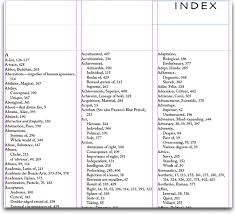
An Index lists the terms and topics discussed in a document, along with the pages they appear on.
- What is word processing used for ?
Example : Microsoft Word , WordPerfect etc.
- Function of a word processor :
Word Wrap and Centering : words that extend beyond the right margin are wrapped around to the next line. Text can be centred between left and right margins
Layout setting : margins, tabs, line spacing, indents , font changes , underlining, boldface and italics can be set and reset anywhere within document.
Headers, Footers and Page numbering : headers and footers are common text printed on the top and bottom of every page were page numbering can be set and reset anywhere within document. It can be roman numerals or alphabetic letters.
Style sheets : a set of formatting characteristics that you can apply to texts, and lists in your document to change their apperance. When you apply a style , you apply whole gorup of formats in one simple task .
Example : instead of taking three separte steps to format a title 16pt, Arial and center-aligned you can do so in one simply step by applying Title style. Other style include Heading 1 and Heading 2.
You can create, view and apply styles from the STYLES AND FORMATING task pane.
Cliparts and pictures : Graphics can be merged into the text and either displayed on screen with the text or in a preview mode before printing. This can be rezized (scaled) , rotated and archored so that it reamins with a particular segment of text. Rules and Borders can also be created within text.
Preview, Print and Group Print :
A document can be preview before printing to show any layout change not normally shown on screen (page breaks, headers, footers etc.). Documents can be printed either individually or as a group with page numbers which is numbered from the first to the last document.
Spelling Checker and Thesaurus : spelling for an individual word, marked block of text or an entire document can be checked. Advance systems can correct the misspellings automatically the next time. A thesaurus displays synonyms for the word at the current cursor location.
______________________________
Advanced Functions :
MAIL MERGE :
Mail Merge is used to create personalized letters by combining together a form letter and a list of data (that may include names, adress etc, ) This list can be created as a document or can be imported from popular database formats.
Mail merge task pane is used to create from letters, mailing labels or envelopes. To complete the basic process, you have to :
- Open or create a main document
- Open or create a data source with individual recipient information.
- Add or customize merge fields in the main document.
- Merge data from the data source into the main document to create a new, merged document
______________________________________
Table Of Contents :
A table of contents is a list of the headings in a doucment. You can use a table of contents to get an overview of the topics discussed in a document. The easiest way to create a table of contents is to use the built-in styles. If you are already using built-in heading styles, follow these steps.
- Click where you want to insert the table of contents.
- On the Insert menu, point to Reference and click Index and Tables.
- Click the Table of Contents tab.
- To use one of the available design in the Formats box.
- Select any other table of contents options you want.
- Select any other table of contents options you want.
__________________________________________
Indexes.
An Index lists the terms and topics discussed in a document, along with the pages they appear on.
- To create an Index, you mark the Index entries in your document and then build the index.
- Once you mark an index entry, Microsoft Words add a special mark (index entry) to your document
- After you've marked all the index entrie, choose and index design and build the finished index.
- Word then collects the index entries nad sort them alphabetically, refernces their page numbers, finds and remorves duplicate entries from the same page, and displays the index the document.
- Use an existing text as an index entry, select the text. To enter your own text as an index entry, click where you want to insert the index entry
- Press ALT + SHIFT + X
- Click where you want to insert finished index .
- On the insert menu, point to Reference, click INDEX AND TABLES and then clock the INDEX tab.
Computer Logic Chapter 2
COMPUTER LOGIC CHAPTER
2
— What’s binary ?
NOTE
: binary is a number system. Its is the ideal number system to represent
two-states because it was only two digits 0 and 1. It is important to notice
that the number system we use in everyday life called the decimal number
system, ten digits is used : 0 1 2 3 4 5 6 7 8 9 .
Definition: A bit (binary
digit) is a single digit from a binary number. It is eight a 0 or a 1.
— Using Many Bits :
The
more bits we use to represent an item of data, the more different values we can
represent. As an example, we will consider 3 bulbs, and write down the
different combinations in which they can be, using 1 to represent a bulb which
is ON on O to represent a blub which is OFF.
Bulb 3 Bulb 2 Bulb 1
0
0 0
0
0 1
0 1 0
0
1 1
1 0 0
1
0 1
1
1 0
1
0 1
Every
4 ^ Every 2 ^ Every 1 ^
NOTE
: with 3 bits you can have 8 different values
__________________________________________
BULB 4
BULB
3
BULB 2
BULB 1
0
0
0
0
0
0
0
1
0
0
1
0
0
0
1
1
0
1
0
0
0
1
0
1
0
1
1
0
0
1
1
1
1
0
0
0
1
0
0
1
1
0
1
0
1
0
1
1
1
1
0
0
1
1
0
1
1
1
1
0
1
1
1
1
Bulb
4 = every 8 = 24=16
Bulb
3 = every 4 = 23= 8
Bulb
2 = every 2 = 22= 4
Bulb
1 = every 1 = 21= 2
NUMBER OF BITS
DIFFERENT VALUES
1
21= 2
2
22=4
3
23=8
4
24=16
5
25=32
6
26=64
7
27=128
n
2n
Note : in general we can
represent 2n for different values
— With
1 bit we can only represent 2 numbers : 0,1
— With
2 bits we can represent 4 numbers. Hence starting from 0, the largest number
that can be represented is 3. Hence the range of decimal numbers that can be
represented is 0…3
2nd bit
1st bit
Representation
decimal
0
0
0
0
1
1
1
0
2
1
1
3
— With
3 bits we can represent 8 numbers. Hence the range of decimal numbers that can
be represented is 0…7
Formula
: 2n-1. Hence the range of decimal numbers that can be represented
is 0…2n…1
___________________________________________________________
Here are the basics binary coveration binary to decimal. Hope you enjoy :)
— Number
conversions
103
102
101
100
Thousand
Hundred
Tens
Units
8
4
2
5
NOTE: in the binary
number system, every bit has a different value always multiplied by 2 as the
bits increment.
26
25
24
23
22
21
20
64
32
16
8
4
2
1
1
1
0
1
0
1
1
— The
bit with the smallest value: Least Significant Bit (LSB) 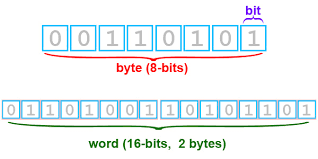
1000 bytes
1000 x 1000 x 1000 bytes
1000 x 1000 x 1000
bytes
Definition: A bit (binary digit) is a single digit from a binary number. It is eight a 0 or a 1.
— Using Many Bits :
The
more bits we use to represent an item of data, the more different values we can
represent. As an example, we will consider 3 bulbs, and write down the
different combinations in which they can be, using 1 to represent a bulb which
is ON on O to represent a blub which is OFF.
0
0 0
0
0 1
0 1 0
0
1 1
1 0 0
1
0 1
1
1 0
1
0 1
Every
4 ^ Every 2 ^ Every 1 ^
NOTE
: with 3 bits you can have 8 different values
__________________________________________
|
BULB 4
|
BULB
3
|
BULB 2
|
BULB 1
|
|
0
|
0
|
0
|
0
|
|
0
|
0
|
0
|
1
|
|
0
|
0
|
1
|
0
|
|
0
|
0
|
1
|
1
|
|
0
|
1
|
0
|
0
|
|
0
|
1
|
0
|
1
|
|
0
|
1
|
1
|
0
|
|
0
|
1
|
1
|
1
|
|
1
|
0
|
0
|
0
|
|
1
|
0
|
0
|
1
|
|
1
|
0
|
1
|
0
|
|
1
|
0
|
1
|
1
|
|
1
|
1
|
0
|
0
|
|
1
|
1
|
0
|
1
|
|
1
|
1
|
1
|
0
|
|
1
|
1
|
1
|
1
|
|
|
|
|
|
Bulb 4 = every 8 = 24=16
Bulb
3 = every 4 = 23= 8
Bulb
2 = every 2 = 22= 4
Bulb
1 = every 1 = 21= 2
|
NUMBER OF BITS
|
DIFFERENT VALUES
|
|
1
|
21= 2
|
|
2
|
22=4
|
|
3
|
23=8
|
|
4
|
24=16
|
|
5
|
25=32
|
|
6
|
26=64
|
|
7
|
27=128
|
|
n
|
2n
|
Note : in general we can
represent 2n for different values
Rangers :
— With
1 bit we can only represent 2 numbers : 0,1
— With
2 bits we can represent 4 numbers. Hence starting from 0, the largest number
that can be represented is 3. Hence the range of decimal numbers that can be
represented is 0…3
|
2nd bit
|
1st bit
|
Representation
decimal
|
|
0
|
0
|
0
|
|
0
|
1
|
1
|
|
1
|
0
|
2
|
|
1
|
1
|
3
|
— With 3 bits we can represent 8 numbers. Hence the range of decimal numbers that can be represented is 0…7
Formula
: 2n-1. Hence the range of decimal numbers that can be represented
is 0…2n…1
___________________________________________________________
Here are the basics binary coveration binary to decimal. Hope you enjoy :)
— Number
conversions
Number in decimal are
said to be base 10 whilst numbers in binary are said to be base 2. In our
decimal number system, every digit has a place value in a power of 10.
|
103
|
102
|
101
|
100
|
|
Thousand
|
Hundred
|
Tens
|
Units
|
|
8
|
4
|
2
|
5
|
NOTE: in the binary number system, every bit has a different value always multiplied by 2 as the bits increment.
Example : 11010112
26
|
25
|
24
|
23
|
22
|
21
|
20
|
|
64
|
32
|
16
|
8
|
4
|
2
|
1
|
|
1
|
1
|
0
|
1
|
0
|
1
|
1
|
— The
bit with the smallest value: Least Significant Bit (LSB)
— The
bit with the largest value : Most Significant Bits (MSB)
— A
hexadecimal number is a short way of writing a binary number. Hexadecimal numbers
system are said to be base 16 because it has 16 digits : 1,2,3,4,5,6,7,8,9, 10-A
,11-B , 12-C ,13-D , 14-E , 15-F , 16-G a binary number can be directly
transferred to hexadecimal numbers by grouping the bits in packets of four,
starting from the LSB , then each packet is given the weights 1,2,4,8 etc. to
convert it into hex digit.
— Representation of Characters
Besides numbers ,
characters are also used in everyday life to express information. This means
that characters also have to be represented in binary using a unique binary
code. This is called the character code
If 8 bits is used to store a character, 256 characters can
be stored (28=256)
— ASCII:
American Standard Code for Information Interchange
is an 8-bit code used to
represent characters in binary.
Eg. The character A
would be represented as 01000012 (6510)
— Units of storage:
In order to represent
numbers, letters and special characters, bits are combined into groups of 8
bits called bytes. Each byte typically represents one character- in many
computers, one addressable storage location.
Unicode:
— While
the ASCII system is widely accepted and used in computer industry, it has a
number of major limitations.
— Unicode
by using 16 bits to represent each character. These 16 bit binary allow 216
different combinations to be represented which can add up to 65,536 different characters.
Binary
Notations
— A
BIT can be either 0 or 1
— A
Byte is made up of 8 bits
— 1
KILOBYTE = 1024 bytes
1000 bytes
— 1
MEGABYTE is 1024 kilobytes
1000 x 1000 x 1000 bytes
— 1
GIGABYTE is 1024
megabytes
1000 x 1000 x 1000
bytes
_________________________________________________________
sorry its a bit long but its a really important chapter so i hope it helped you :)
Subscribe to:
Comments (Atom)