COMPUTER LOGIC CHAPTER
2
— What’s binary ?
NOTE
: binary is a number system. Its is the ideal number system to represent
two-states because it was only two digits 0 and 1. It is important to notice
that the number system we use in everyday life called the decimal number
system, ten digits is used : 0 1 2 3 4 5 6 7 8 9 .
Definition: A bit (binary
digit) is a single digit from a binary number. It is eight a 0 or a 1.
— Using Many Bits :
The
more bits we use to represent an item of data, the more different values we can
represent. As an example, we will consider 3 bulbs, and write down the
different combinations in which they can be, using 1 to represent a bulb which
is ON on O to represent a blub which is OFF.
Bulb 3 Bulb 2 Bulb 1
0
0 0
0
0 1
0 1 0
0
1 1
1 0 0
1
0 1
1
1 0
1
0 1
Every
4 ^ Every 2 ^ Every 1 ^
NOTE
: with 3 bits you can have 8 different values
__________________________________________
BULB 4
BULB
3
BULB 2
BULB 1
0
0
0
0
0
0
0
1
0
0
1
0
0
0
1
1
0
1
0
0
0
1
0
1
0
1
1
0
0
1
1
1
1
0
0
0
1
0
0
1
1
0
1
0
1
0
1
1
1
1
0
0
1
1
0
1
1
1
1
0
1
1
1
1
Bulb
4 = every 8 = 24=16
Bulb
3 = every 4 = 23= 8
Bulb
2 = every 2 = 22= 4
Bulb
1 = every 1 = 21= 2
NUMBER OF BITS
DIFFERENT VALUES
1
21= 2
2
22=4
3
23=8
4
24=16
5
25=32
6
26=64
7
27=128
n
2n
Note : in general we can
represent 2n for different values
— With
1 bit we can only represent 2 numbers : 0,1
— With
2 bits we can represent 4 numbers. Hence starting from 0, the largest number
that can be represented is 3. Hence the range of decimal numbers that can be
represented is 0…3
2nd bit
1st bit
Representation
decimal
0
0
0
0
1
1
1
0
2
1
1
3
— With
3 bits we can represent 8 numbers. Hence the range of decimal numbers that can
be represented is 0…7
Formula
: 2n-1. Hence the range of decimal numbers that can be represented
is 0…2n…1
___________________________________________________________
Here are the basics binary coveration binary to decimal. Hope you enjoy :)
— Number
conversions
103
102
101
100
Thousand
Hundred
Tens
Units
8
4
2
5
NOTE: in the binary
number system, every bit has a different value always multiplied by 2 as the
bits increment.
26
25
24
23
22
21
20
64
32
16
8
4
2
1
1
1
0
1
0
1
1
— The
bit with the smallest value: Least Significant Bit (LSB) 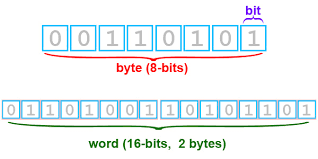
1000 bytes
1000 x 1000 x 1000 bytes
1000 x 1000 x 1000
bytes
Definition: A bit (binary digit) is a single digit from a binary number. It is eight a 0 or a 1.
— Using Many Bits :
The
more bits we use to represent an item of data, the more different values we can
represent. As an example, we will consider 3 bulbs, and write down the
different combinations in which they can be, using 1 to represent a bulb which
is ON on O to represent a blub which is OFF.
0
0 0
0
0 1
0 1 0
0
1 1
1 0 0
1
0 1
1
1 0
1
0 1
Every
4 ^ Every 2 ^ Every 1 ^
NOTE
: with 3 bits you can have 8 different values
__________________________________________
|
BULB 4
|
BULB
3
|
BULB 2
|
BULB 1
|
|
0
|
0
|
0
|
0
|
|
0
|
0
|
0
|
1
|
|
0
|
0
|
1
|
0
|
|
0
|
0
|
1
|
1
|
|
0
|
1
|
0
|
0
|
|
0
|
1
|
0
|
1
|
|
0
|
1
|
1
|
0
|
|
0
|
1
|
1
|
1
|
|
1
|
0
|
0
|
0
|
|
1
|
0
|
0
|
1
|
|
1
|
0
|
1
|
0
|
|
1
|
0
|
1
|
1
|
|
1
|
1
|
0
|
0
|
|
1
|
1
|
0
|
1
|
|
1
|
1
|
1
|
0
|
|
1
|
1
|
1
|
1
|
|
|
|
|
|
Bulb 4 = every 8 = 24=16
Bulb
3 = every 4 = 23= 8
Bulb
2 = every 2 = 22= 4
Bulb
1 = every 1 = 21= 2
|
NUMBER OF BITS
|
DIFFERENT VALUES
|
|
1
|
21= 2
|
|
2
|
22=4
|
|
3
|
23=8
|
|
4
|
24=16
|
|
5
|
25=32
|
|
6
|
26=64
|
|
7
|
27=128
|
|
n
|
2n
|
Note : in general we can
represent 2n for different values
Rangers :
— With
1 bit we can only represent 2 numbers : 0,1
— With
2 bits we can represent 4 numbers. Hence starting from 0, the largest number
that can be represented is 3. Hence the range of decimal numbers that can be
represented is 0…3
|
2nd bit
|
1st bit
|
Representation
decimal
|
|
0
|
0
|
0
|
|
0
|
1
|
1
|
|
1
|
0
|
2
|
|
1
|
1
|
3
|
— With 3 bits we can represent 8 numbers. Hence the range of decimal numbers that can be represented is 0…7
Formula
: 2n-1. Hence the range of decimal numbers that can be represented
is 0…2n…1
___________________________________________________________
Here are the basics binary coveration binary to decimal. Hope you enjoy :)
— Number
conversions
Number in decimal are
said to be base 10 whilst numbers in binary are said to be base 2. In our
decimal number system, every digit has a place value in a power of 10.
|
103
|
102
|
101
|
100
|
|
Thousand
|
Hundred
|
Tens
|
Units
|
|
8
|
4
|
2
|
5
|
NOTE: in the binary number system, every bit has a different value always multiplied by 2 as the bits increment.
Example : 11010112
26
|
25
|
24
|
23
|
22
|
21
|
20
|
|
64
|
32
|
16
|
8
|
4
|
2
|
1
|
|
1
|
1
|
0
|
1
|
0
|
1
|
1
|
— The
bit with the smallest value: Least Significant Bit (LSB)
— The
bit with the largest value : Most Significant Bits (MSB)
— A
hexadecimal number is a short way of writing a binary number. Hexadecimal numbers
system are said to be base 16 because it has 16 digits : 1,2,3,4,5,6,7,8,9, 10-A
,11-B , 12-C ,13-D , 14-E , 15-F , 16-G a binary number can be directly
transferred to hexadecimal numbers by grouping the bits in packets of four,
starting from the LSB , then each packet is given the weights 1,2,4,8 etc. to
convert it into hex digit.
— Representation of Characters
Besides numbers ,
characters are also used in everyday life to express information. This means
that characters also have to be represented in binary using a unique binary
code. This is called the character code
If 8 bits is used to store a character, 256 characters can
be stored (28=256)
— ASCII:
American Standard Code for Information Interchange
is an 8-bit code used to
represent characters in binary.
Eg. The character A
would be represented as 01000012 (6510)
— Units of storage:
In order to represent
numbers, letters and special characters, bits are combined into groups of 8
bits called bytes. Each byte typically represents one character- in many
computers, one addressable storage location.
Unicode:
— While
the ASCII system is widely accepted and used in computer industry, it has a
number of major limitations.
— Unicode
by using 16 bits to represent each character. These 16 bit binary allow 216
different combinations to be represented which can add up to 65,536 different characters.
Binary
Notations
— A
BIT can be either 0 or 1
— A
Byte is made up of 8 bits
— 1
KILOBYTE = 1024 bytes
1000 bytes
— 1
MEGABYTE is 1024 kilobytes
1000 x 1000 x 1000 bytes
— 1
GIGABYTE is 1024
megabytes
1000 x 1000 x 1000
bytes
_________________________________________________________
sorry its a bit long but its a really important chapter so i hope it helped you :)

No comments:
Post a Comment